August 12, 2019

New feature: Surveys

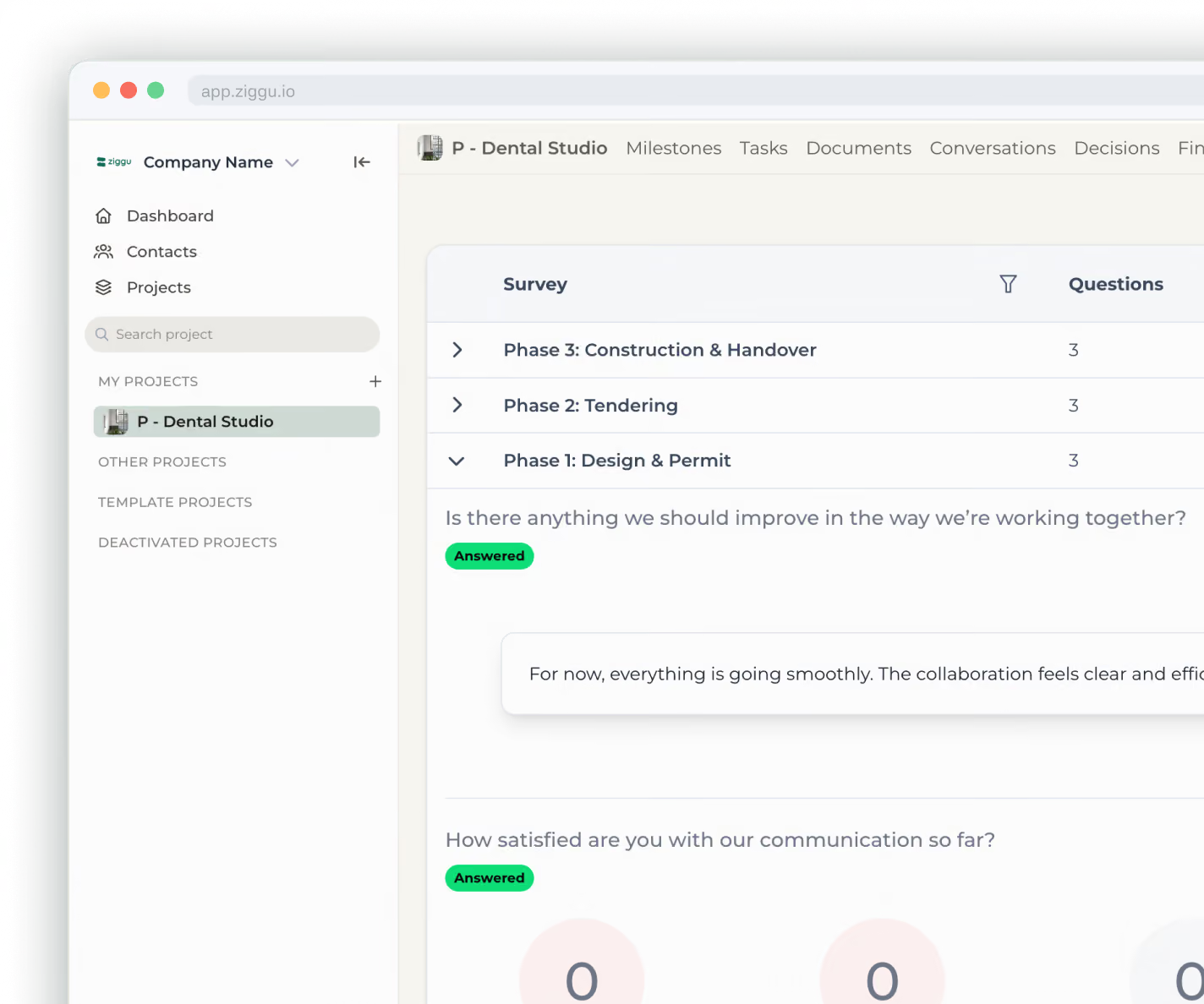
Ziggu's new surveys feature helps property developers efficiently collect customer feedback and track Net Promoter Scores to improve customer experiences throughout projects.

Ziggy with a microphone
Follow us for more content

Ziggu's new surveys feature transforms how property developers collect customer feedback and track satisfaction. Built to simplify feedback collection and measure Net Promoter Scores, this tool helps developers understand customer sentiment and improve experiences throughout the project lifecycle.

What Makes Ziggu Surveys Feature Essential for Property Developers and Quick Setup Process

When we build new tools at Ziggu, they have to answer to two criteria:

  1. Help property developers work more efficiently, and…
  2. Increase the customer experience for the homebuyer.

You can understand that this new feature has been on top of our product wish list for a while. The Survey tool allows you in a few clicks to launch a question to your customers and collect their feedback.

It helps you to understand how you are doing today and where you can improve your customer experience in the future. As customer experience becomes increasingly important for residential developers, having the right tools to measure satisfaction is crucial.

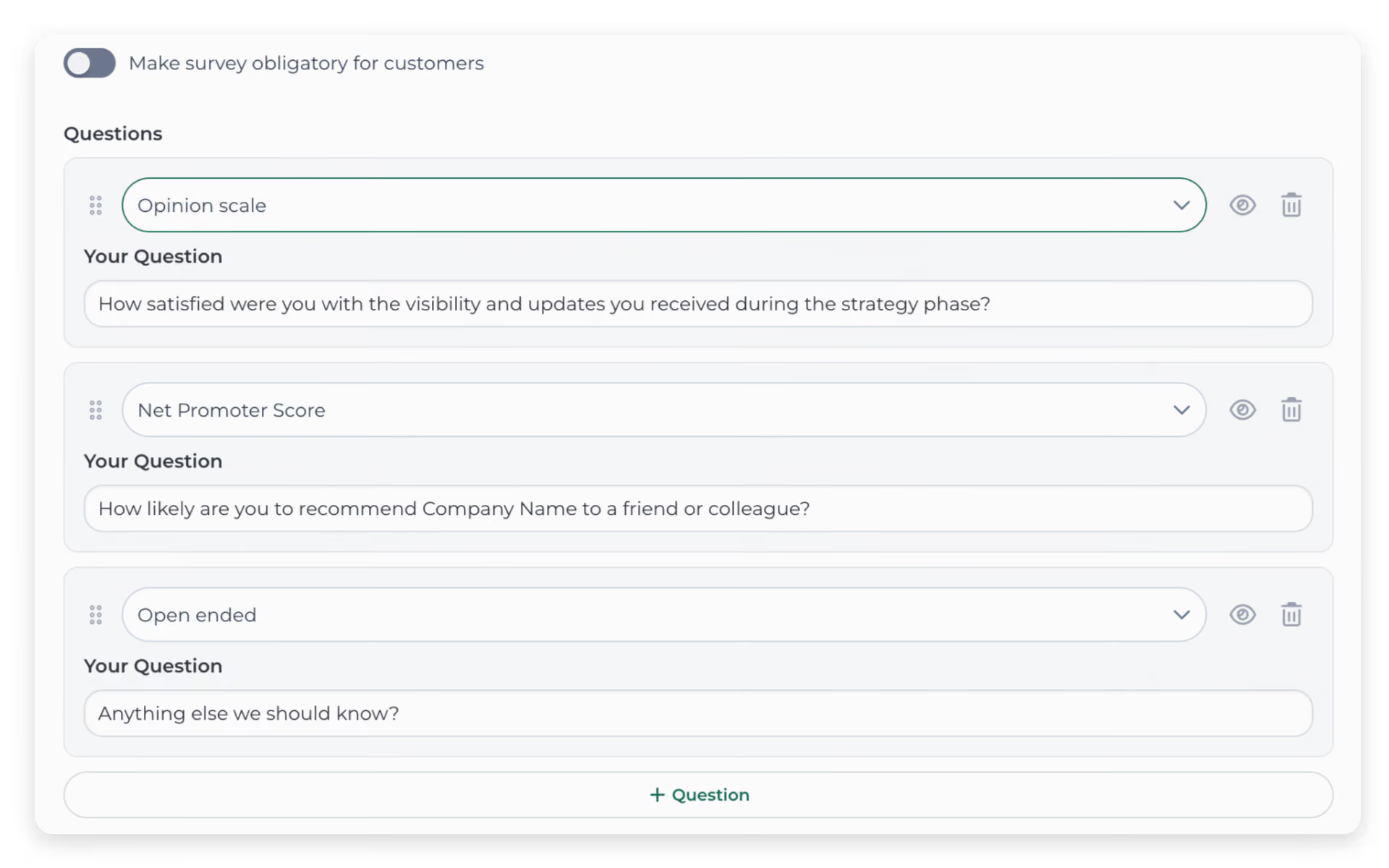
Setting up surveys in Ziggu takes minutes. The streamlined interface makes feedback collection effortless for both developers and customers. Launch your first survey in three simple steps:

  1. Choose survey type: Select NPS or custom question format
  2. Set target audience: Send to specific project phases or all customers
  3. Deploy instantly: Surveys appear directly in customer portals

The survey feature integrates smoothly with existing portal workflows. Customers receive notifications through the same platform they use for project updates and document access.

How to Track Your Net Promoter Score with Ziggu Surveys

We have built in an option "NPS", where you can ask a predefined question: "How likely are you to recommend us to a friend or colleague?"

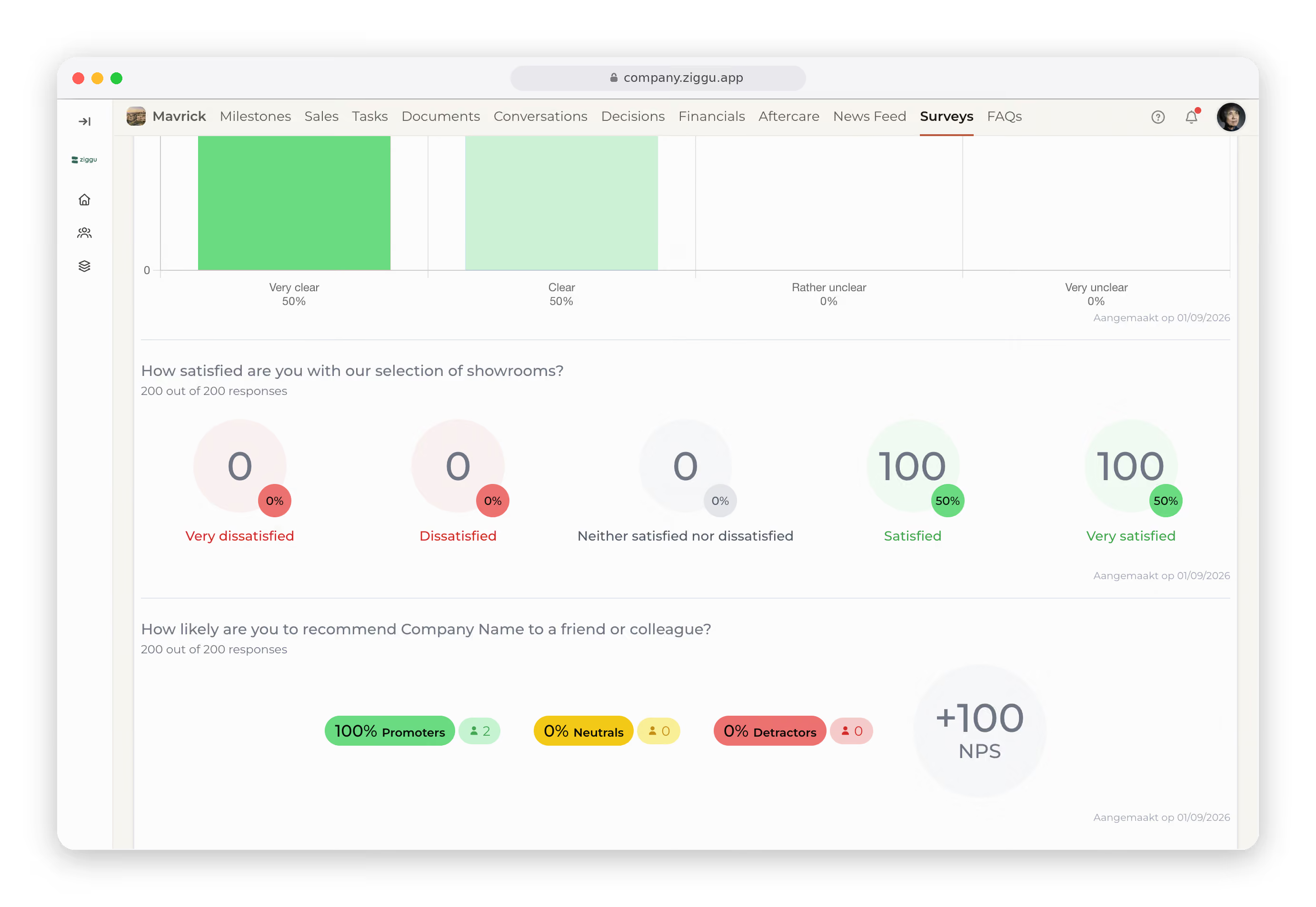
The Net Promoter Score will give you an idea of how enthusiastic your customers are and if they would actively promote your company or project.

Each customer can give you a score between 0 and 10, from not likely at all to extremely likely.

NPS Survey Methodology: Understanding Customer Categories

Your customers are then divided into three categories:

Category Score Range Description
Promoters 9-10 Loyal enthusiasts who will refer others, fueling growth
Passives 7-8 Satisfied but unenthusiastic customers who are vulnerable to competitive offerings
Detractors 0-6 Unhappy customers who can damage your brand and impede growth through negative word-of-mouth

The result is a score between -100 and 100 and is calculated using the following formula: % Promoters – % Detractors = NPS. Passive customers are not taken into account.

NPS score information
Net Promoter, Net Promoter Score and NPS are registered trademarks of Bain & Company, Inc., Satmetrix Systems, Inc., and Fred Reichheld.

Industry Benchmarks and Survey Timing Best Practices

Industry benchmarks help contextualize your results. The construction and real estate sector faces unique customer experience challenges that often impact satisfaction scores differently than other industries.

Property development involves long timelines, complex processes, and high-stakes decisions. These factors create particular challenges when measuring customer satisfaction throughout the project lifecycle.

Strategic timing maximizes response rates and data quality:

  • Pre-construction phase: Measure initial satisfaction with sales process
  • Mid-construction: Track communication effectiveness during build
  • Handover period: Capture satisfaction with final delivery
  • Post-move-in: Assess overall experience and aftercare quality

Custom Feedback Collection and Response Analytics

While NPS provides standardized measurement, custom surveys address specific project needs. The flexibility lets you ask targeted questions about particular aspects of the customer journey.

Examples include satisfaction with specific contractors, communication preferences, or feature requests for future projects. This targeted approach helps developers understand which aspects of their service delivery need improvement.

Survey responses integrate with your project dashboard. Track trends over time, compare scores across projects, and identify areas needing attention.

The analytics help you spot patterns—perhaps communication issues during certain project phases or consistently high satisfaction with specific team members. This data-driven approach to customer experience improvement can help developers manage large-scale projects more efficiently by addressing feedback proactively.

Implementation in Existing Workflows and Automated Triggers

The surveys feature works within Ziggu's broader client portal network. It connects with Documents, Conversations, Tasks, and Milestones features already in use.

This integration means survey deployment doesn't disrupt established workflows. Customers access surveys through the same portal they use for all project communication, creating a seamless experience.

Set up automatic survey deployment based on project milestones. When foundations complete or keys get handed over, surveys can trigger automatically. This automation ensures consistent feedback collection without manual intervention for each project phase.

Survey responses remain within your Ziggu environment. Customer feedback stays confidential and under your control. The system maintains audit trails showing who responded when, while keeping individual responses anonymous if needed for sensitive feedback topics.

Getting Started with Ziggu Surveys Feature

The surveys feature is available to all Ziggu users as part of the standard platform. No additional setup or integration work is required.

Navigate to the surveys section in your admin panel and create your first feedback collection campaign. The intuitive interface guides you through question setup and audience selection.

Property developers using client survey tools like Ziggu's surveys feature gain direct insight into customer satisfaction throughout project lifecycles. The combination of standardized NPS tracking and custom feedback collection provides comprehensive understanding of customer experience quality—enabling targeted improvements that strengthen client relationships and project outcomes.

Frequently Asked Questions

What is the difference between NPS and custom surveys in Ziggu?

NPS surveys use the standardized "How likely are you to recommend us?" question with a 0-10 scale, automatically calculating your Net Promoter Score. Custom surveys allow you to ask specific questions about particular aspects of your service or project phases.

How often should I send surveys to my customers?

Best practice is to align surveys with key project milestones: pre-construction, mid-construction, handover, and post-move-in. This provides comprehensive feedback without overwhelming customers with too frequent requests.

Can surveys be sent automatically based on project progress?

Yes, Ziggu allows you to set up automated survey triggers based on project milestones. When specific phases complete, surveys deploy automatically without manual intervention.

How are survey responses stored and who can access them?

All survey responses remain within your Ziggu environment under your control. The system maintains audit trails showing response timing while keeping individual feedback anonymous when needed.

What happens if customers don't respond to surveys?

Non-responses don't affect your NPS calculation, which only considers actual respondents. You can send gentle reminders through the same portal system or adjust your survey timing strategy.

Can I compare survey results across different projects?

Yes, the analytics dashboard lets you track trends over time and compare scores across multiple projects. This helps identify patterns and areas for improvement across your portfolio.

Do I need additional setup to use the surveys feature?

No additional setup is required. The surveys feature is available to all Ziggu users as part of the standard platform and integrates with your existing portal workflows.

Boost your customer happiness and efficiency with Ziggu. Connect with our sales team today.

SCHEDULE A DEMO
Ziggy-mascot waving and smiling

Stay up-to-date thanks to our hyper-relevant newsletters.

SUBSCRIBE
Ziggy-mascot waving and smiling